
How Code Agents Go Far Beyond Running an LLM Alone with Tool Use
Code agents like Claude Code generate far better code than LLM alone by leveraging diverse tools. This article dives into how tool use makes that possible.
Claude Code is a surprisingly powerful tool for writing code. I recently used it while wrapping up my master’s research. Given a clearly specified task, it generates the code, verifies it in my environment, and asks for my approval for applying final edits. With its help, I could add a new experiment setup, extract desired data from a messy experiment log, catch a potential bug in a shell script that would have run for half a day — all in just a couple of minutes. Otherwise, I would have spent at least a few hours writing code from scratch, or gotten annoyed the next morning by a minor bug that silently ruined a half-day-long experiment 🥲.
So, is it purely the capability of a superior LLM itself? Indeed, a model alone can already generate reasonably good code — at least near-zero grammar errors, thanks to training on vast amounts of code. However, as fundamentally a next token predictor, it cannot guarantee functional correctness for complex tasks by chaining probable words. Moreover, the model has no way of knowing the underlying software versions, file dependencies, or hardware specifications unless explicitly given by the prompt. So, there should be something that steers the model to improve its code to satisfy both the functionality and the constraints of the actual working environment. This is the core concept of a code agent, and what differentiates it from a simple ask-and-answer chatbot.
In this article, we will closely look at how code agents leverage tools to overcome the limitations of running an LLM alone, and produce code that precisely matches the user’s specific requirements.
So, what do we exactly call a tool? Intuitively, it is anything executed outside of the LLM’s direct forward pass — such as reading files, executing code, searching the web, or even invoking LLM with a different system prompt. Early research proposed agentic workflows with an LLM at the core, augmented by tools to overcome potential hallucinations and bugs in the actual working environment. By doing so, the model refines its output to more precisely meet the user’s desired task. In the following paragraphs, let’s explore a few concrete ideas that illustrate the role of tools in a code generation workflow.
CodeT1 introduces a tool for generating test cases, which delegates their generation to the LLM itself, alongside the implementation code. This reduces the human effort for time-consuming test case preparation, pushing code verification into the code generation pipeline.
Beyond evaluating code once, Reflexion2 introduces a tool for executing LLM-generated code and feeding the execution results (e.g., logs) and reflection (i.e., the LLM’s explanation of those results) back to the LLM to guide the model to improve its code. Self-Debugging3 proposes additional feedback formats beyond direct execution results, such as code explanation (rubber duck debugging 🐥) or line-by-line simulation traces (similar to GDB 🔎🐞) — both generated by the LLM itself.
MetaGPT4 proposes a complete code generation system analogous to a software company in the human world, consisting of various tools (or multi-agents, in the paper’s terminology). For example, the Architect tool translates the user’s requirement into a system design — a high-level program flow and a directory structure; the Project Manager tool breaks the design down into concrete tasks and defines what each file is responsible for; the Engineer tool writes implementation code; and the QA Engineer tool generates test cases and verifies the implementation by executing it. The Engineer and QA Engineer tools are iteratively invoked, refining the code based on execution history until the test results are satisfactory. Note that many of the tools here are LLM calls, each specialized by its own system prompt to carry role-specific priors, while tools like code execution or file updates are purely external operations that do not involve LLM inference.
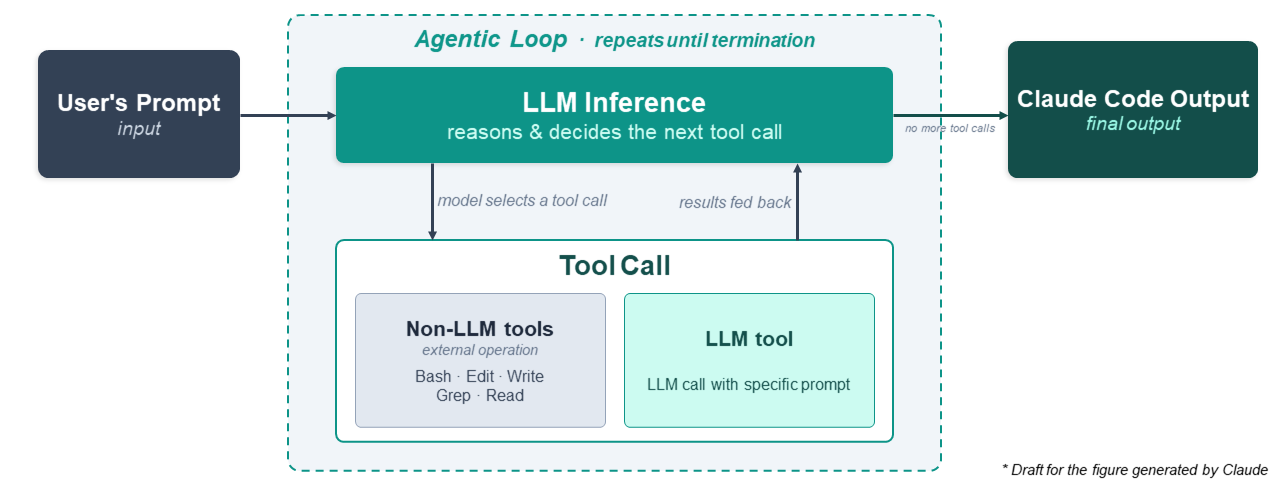
While the prior academic works mentioned above assume a predefined tool use sequence (e.g., code generation, test case generation, execution, and reflection), Claude Code takes a model-driven, dynamic approach — the LLM decides which tools to call at each step based on the user’s prompt and previous tool results. This builds on the paradigm proposed in ReAct5, which interleaves the model’s reasoning with actions — tool calls — so that each step is chosen dynamically from context rather than predefined: the model reasons about what to do, takes an action, observes the result, and reasons again.
The outermost loop of Claude Code alternates between model inference and tool use. The model outputs the most appropriate tool call — specifying the tool name and required arguments — based on the given context, the corresponding tool is then executed, and the related results are fed back into the model. This iteration continues until the model no longer calls any tools, reaches the maximum turn limit, or other termination conditions are met.
Official documentation6 lists built-in tools in Claude Code. Let’s take a look at a few example tools that make Claude Code a more practical and complete product, beyond academic works.
- File Search —
Globfinds files matching a pattern (e.g., */.py), andGrepsearches for specific keywords or function names in file contents.Readthen loads the relevant files, from text to image/pdf/ipynb files, into context. Together, these tools replace the manual step of telling the model which files to look at. - File Edit — Once the code is generated,
Editapplies targeted modifications to specific files by replacing the old string, andWritecreates or overwrites files with the full content provided. - Execution —
Bashexecutes shell commands directly in the user’s environment in a separate process. Running a Python script, compiling a C++ binary, or executing a test suite can all be generalized as Bash commands. The execution results — stdout, stderr, exit codes — are fed back into the model as context for the next step. - Web —
WebSearchfinds relevant titles and their URLs from a search query, andWebFetchretrieves the content of a specific URL and extracts the required information. These tools are useful for looking up error messages, fetching up-to-date documentation, or searching for solutions beyond the model’s training data. - Plan —
EnterPlanModeandExitPlanModeexplicitly separate the planning phase from the execution phase. When invoked, Claude Code drafts a high-level approach to the task and presents it to the user for approval. This roughly corresponds to the role of the Project Manager in MetaGPT, but triggered dynamically rather than as a fixed step. - Agent — For subtasks that can be handled independently of the main conversation history,
Agentspawns a subagent with its own context window. The subagent completes its specified task, and returns only the final result to the parent, without accumulating the intermediate context in the parent conversation history. Unlike other tools,Agent’s execution is itself an LLM call, just in a separate, isolated context.
Note that tools that can directly affect the state of the user’s local environment, such as Edit, Write, Bash, and ExitPlanMode, require explicit user approval before execution.
Throughout the article, we explored how code agents go far beyond running an LLM alone by leveraging tools proposed in both research works and a real-world product, Claude Code — from test case generation to code execution to dynamic tool scheduling. Among the diverse emerging agentic workflows, I think code agents stand out as one of the most compelling examples: the use case is well-defined and clear, the tool logic is intuitive — non-AI tools compensate for potential hallucinations through real execution and verification — and the value is concrete enough that people actually pay for it 💳🫢 — yes, including Claude Code Max at over $100 a month.
In the near future, I expect new research directions to arise around serving code agents more efficiently — such as improving LLM serving frameworks for integrating dynamic, non-LLM executions alongside LLM inference (e.g., running the target program on CPU), managing context memory under long agentic loops, or optimizing the tool execution schedule. In that sense, code agents are a pioneering and representative example of agentic workflows worth understanding — not just for demystifying their surprising capability, but for a foundation for the research and engineering questions they open up.
-
[ICLR ‘23] Chen, Bei, et al. “CodeT: Code Generation with Generated Tests.” ↩
-
[NeurIPS ‘23] Shinn, Noah, et al. “Reflexion: Language agents with verbal reinforcement learning.” ↩
-
[ICLR ‘24] Chen, Xinyun, et al. “Teaching large language models to self-debug.” ↩
-
[ICLR ‘24] Hong, Sirui, et al. “MetaGPT: Meta programming for a multi-agent collaborative framework.” ↩
-
[ICLR ‘23] Yao, Shunyu, et al. “ReAct: Synergizing Reasoning and Acting in Language Models.” ↩
-
https://code.claude.com/docs/en/tools-reference ↩